
POINT 1
Your files never leave your PC
The AI runs entirely on your computer. Family photos, client files and confidential documents can be enhanced without ever being uploaded.
Local AI enhancer — no uploads
Color Survey upscales, denoises, restores and colorizes your photos, videos and PDFs.
All AI processing runs on your own PC. Your photos and documents are never sent to an external server.


With Color Survey, everything stays on your PC.
Both can make your images look better with AI. The difference is where your data is processed.
| Color Survey | AI chatbots & online AI services | |
|---|---|---|
| Where it's processed | On your own PC | On the provider's servers |
| Uploading files | Nothing leaves your computer | Files must be uploaded over the internet |
| Pricing | One-time purchase | Often monthly or usage-based plans |
| How you use it | Open a file and click | Describe each edit in a prompt |
| Video & PDF | Videos and multi-page PDFs, processed as they are | Not supported by some services |
| At work | Enhance confidential files without them leaving your desk | May be restricted by company policy |
* Descriptions of AI chatbots and online AI services reflect general trends and vary by service.
Drag the handle in the middle of each image to compare before and after. Every example was enhanced locally — nothing was uploaded.


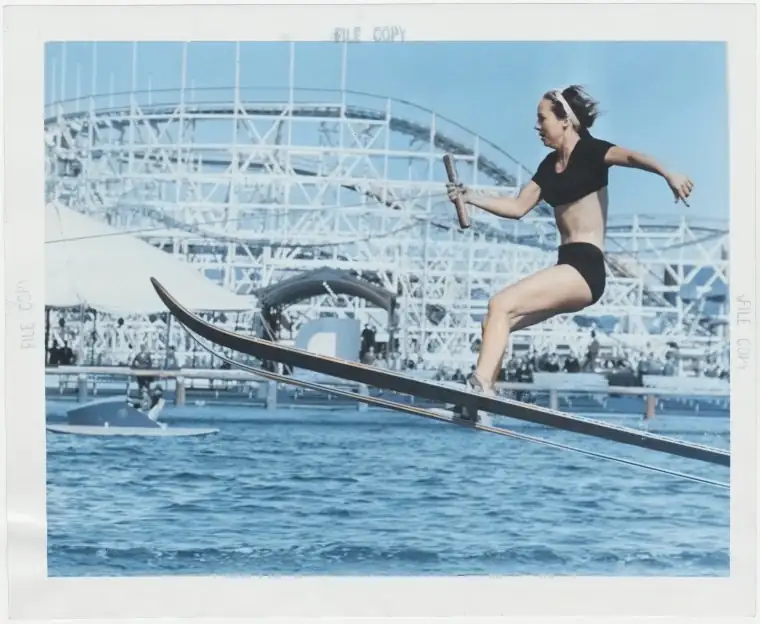
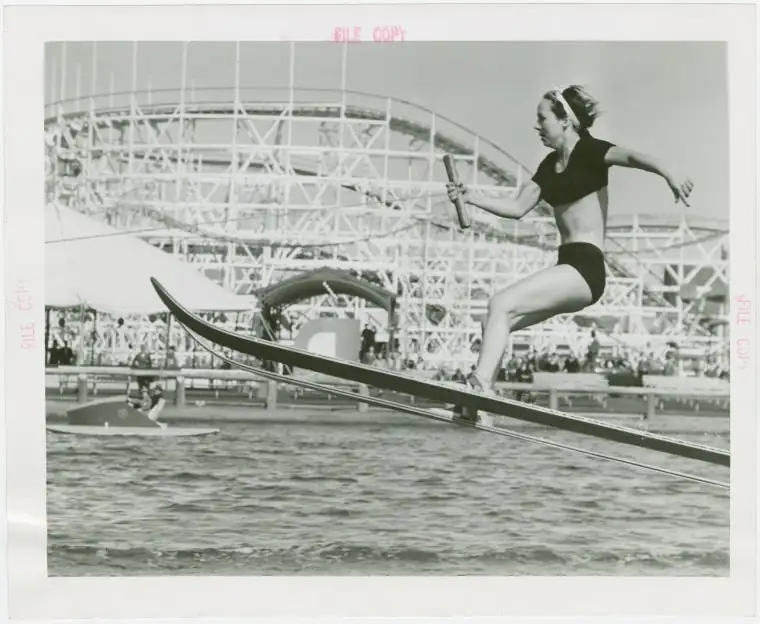




Great results matter. So does knowing exactly where your files go.
POINT 1
The AI runs entirely on your computer. Family photos, client files and confidential documents can be enhanced without ever being uploaded.
POINT 2
A one-time purchase with no monthly fees, so you can use it whenever you need without worrying about usage caps.
POINT 3
There's nothing to describe. Open a file, click once, and the AI recognizes faces, text and shapes and enhances each appropriately.
POINT 4
One app handles still images, home-video footage and multi-page scanned PDFs.
Six AI enhancement tools for every kind of image-quality problem — all running on your PC.
Enlarge small or low-resolution images without the blur, ready for printing or big screens.
Clean up grain from low-light shots and soften the blur from missed focus.
Reduce fading, yellowing, scratches and stains so old prints look closer to new.
Add natural color to black-and-white photos and see your family history in a new light.
Reduce noise and restore faded colors in home videos — and colorize black-and-white footage.
Standard: up to 30 seconds
Premium: unlimited
Make text in low-resolution scans and digitized books crisp and readable.
Standard: up to 5 pages
Premium: unlimited

JPGPNG
Photos from your phone or camera, and scanned images — just open them.
MP4AVIMOVGIF
Digitized home videos, saved clips and even short animated GIFs.

Scanned documents and books, enhanced right inside the PDF.
Download the free trial or the full version and launch it on your PC.
Choose the photo, video or PDF you want to enhance. It never leaves your computer.
The AI enhances it automatically. Check the result and save — that's it.
Enhance close-ups of your kids or photos taken at home without sending them anywhere.
Colorize old black-and-white family photos and start a conversation about the past.
Clean up school events and vacation footage before you archive it.
Make scanned PDFs readable even when policy forbids uploading them to outside services.
Upscale unreleased product shots and past projects entirely in-house.
Turn scans of old documents and books into crisp, readable PDFs.
AI chatbots and online image enhancers have made it easy to improve a photo — but to use them, your images have to be uploaded to the provider’s servers. How that data is stored and used depends on each service’s terms.
Family photos, pictures of your children, client files, confidential documents: if you’d rather not hand any of these to a third party, Color Survey is built for you. All AI processing happens on your own PC, so your files never leave your hands.
When you enlarge an image the traditional way, the software has to guess the missing detail from neighboring pixels — which is why the result looks blurry. Color Survey’s AI recognizes what it’s looking at, like hair, skin or text, and reconstructs fine detail accordingly. Because upscaling and noise reduction happen at the same time, you get a sharper image without amplifying grain.
Color Survey also handles video enhancement and scanned PDF enhancement. Process home-video footage and multi-page PDFs locally, without prompting an AI image by image.
64-bit Windows 10 (version 1903 or later) or Windows 11, with a GPU that has 8 GB or more of memory. macOS and Linux versions are in development.
No subscription, no monthly fees. Start with the free trial and see how much sharper your own photos can get.
See the results on your own files
FreeTry before you buy
Download free trialFor photos and illustrations
$49one-time payment
Buy StandardRecommended
For long videos and large PDF archives
$299one-time payment
Buy PremiumSecure checkout powered by Lemon Squeezy. Your payment is protected.
No. All AI processing happens on your own computer, so your photos, videos and PDFs are never sent to an external server. Family photos and confidential documents stay on your PC.
The key difference is where your data is processed. AI chatbots and online AI services require you to upload your images to the provider's servers. Color Survey processes everything locally on your PC, so nothing leaves your computer. It's also a one-time purchase, and there are no prompts to write — just open a file and click.
Yes. The free trial lets you check the results on your own files and confirm that it runs well on your PC. The trial allows up to 3 uses per launch, up to 30 seconds of video and up to 5 PDF pages.
Standard includes unlimited image enhancement, plus video up to 30 seconds and PDFs up to 5 pages. If you want to enhance longer videos or larger PDF documents, choose Premium, which has no limits on video length or PDF pages.
No. Both Standard and Premium are one-time purchases with no monthly fees.
You can buy Color Survey through our Lemon Squeezy store, with secure checkout.
Color Survey currently supports 64-bit Windows 10 (version 1903 or later) and Windows 11. macOS and Linux versions are in development.
You'll need a GPU with 8 GB or more of memory and 1 GB of free storage. Because the AI runs on your graphics card, we recommend checking performance with the free trial before buying.
Images in JPG and PNG, videos in MP4, AVI, MOV and GIF, and PDF documents.
Yes. As stated in our Terms of Use, pricing differs for individuals and businesses, so please contact us before using Color Survey in a business setting.
Of course. Send us a direct message on X or an email — we're happy to help.
Upscaling, restoration and colorization, all processed on your own computer. Start with the free trial.